
Appearance
如何修改数学公式的字体?
效果对比
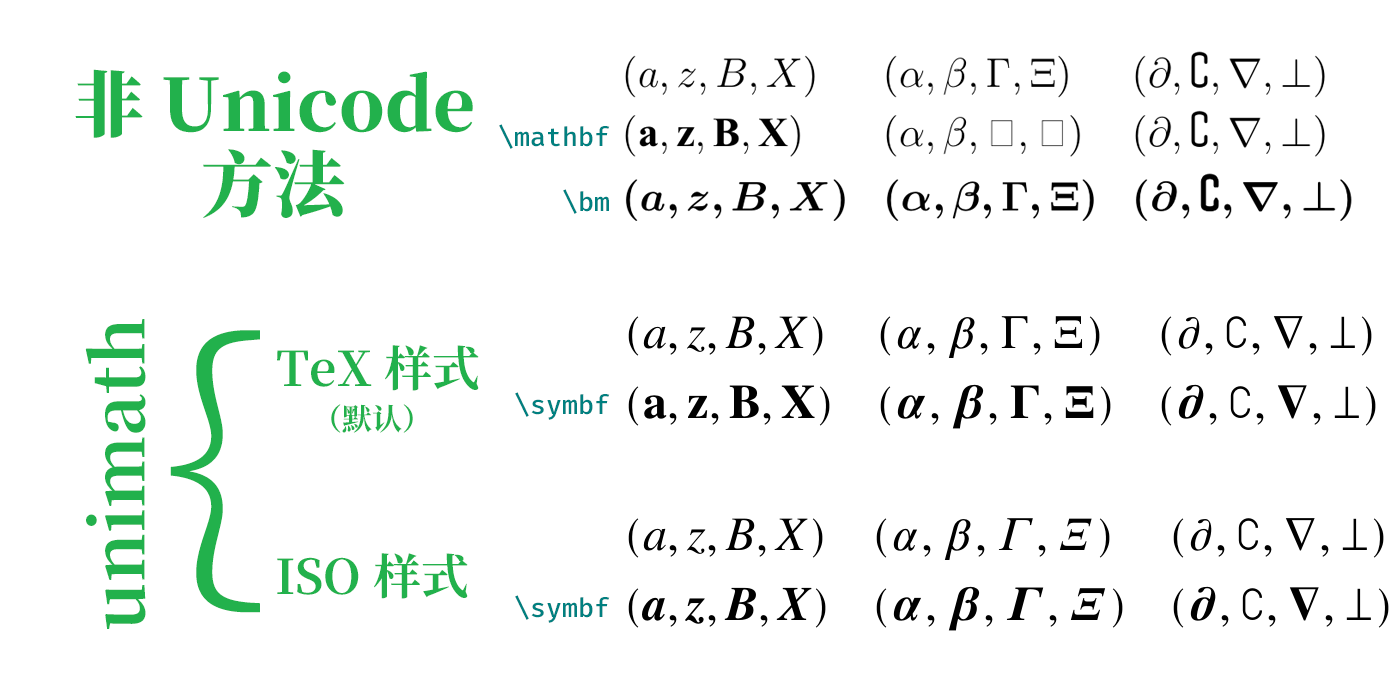
非 Unicode 方法
直接书写、使用原生的
\mathbf、使用bm宏包提供的\bm。Unicode 方法(简称 unimath)
使用
unicode-math宏包设置字体为 TeX Gyre Termes Math(具体方法见后)。TeX 样式即默认样式,ISO 样式需手动导入宏包并设置\unimathsetup{ math-style = ISO, bold-style = ISO }。
测试细节
排除字体差异后,非 Unicode 方法和 Unicode 方法的关键区别是映射的字符不同。从 PDF 中复制公式出来,会得到以下这些字符,可以看到只有 Unicode 方法会采用粗体字符。
(a, z, B, X) (α, β, Γ, Ξ) (∂, ∁, ∇, ⊥)
(a, z, B, X) (α, β, ?, ?) (∂, ∁, ∇, ⊥)
(a, z, B, X) (α, β, Γ, Ξ) (∂, ∁∁∁, ∇, ⊥)

(𝑎, 𝑧, 𝐵, 𝑋) (𝛼, 𝛽, Γ, Ξ) (𝜕, ∁, ∇, ⟂)
(𝐚, 𝐳, 𝐁, 𝐗) (𝜶, 𝜷, 𝚪, 𝚵) (𝝏, ∁, 𝛁, ⟂)

(𝑎, 𝑧, 𝐵, 𝑋) (𝛼, 𝛽, 𝛤, 𝛯) (𝜕, ∁, ∇, ⟂)
(𝒂, 𝒛, 𝑩, 𝑿) (𝜶, 𝜷, 𝜞, 𝜩) (𝝏, ∁, 𝛁, ⟂)此外,字体缺少字形时(比如加粗∁),Unicode 方法会放弃,而bm宏包可能通过复制三份叠加来制造字形(所以出现了∁∁∁)。
用于测试的具体代码如下,包含大小写拉丁和希腊字母,以及几个特殊符号。
latex
\begin{equation}
  \begin{aligned}
  & (a, z, B, X) && (\alpha, \beta, \Gamma, \Xi) && (\partial, \complement, \nabla, \perp) \\
  & \symbf{(a, z, B, X)} && \symbf{(\alpha, \beta, \Gamma, \Xi)} && \symbf{(\partial, \complement, \nabla, \perp)}
  % & \mathbf{(a, z, B, X)} && \mathbf{(\alpha, \beta, \Gamma, \Xi)} && \mathbf{(\partial, \complement, \nabla, \perp)} \\
  % & \bm{(a, z, B, X)} && \bm{(\alpha, \beta, \Gamma, \Xi)} && \bm{(\partial, \complement, \nabla, \perp)}
  \end{aligned}
\end{equation}
BIThesis
请编辑main.tex,用\BITSetup设置style/mathFont选项,例如:
latex
\BITSetup{
  …,
  style = {
    mathFont = termes,
  },
}这里terms指 TeX Gyre Termes Math 字体,它相当接近 Times New Roman。
二者可见区别
Termes 的斜体𝑧和粗斜体𝒛最后一笔都是弯的(弯的样子参考上面的效果对比),而 Times 只有粗斜体𝒛如此,普通斜体𝑧则是直的。
以下设置能混合两种字体,让斜体使用 Times;不过数学字体的细节对于学位论文并不重要,而且这种设置方法还会导致 Times 缺少的∂等字符无法显示,所以非常不建议使用。
latex
\usepackage{unicode-math}
\setmathfont{texgyretermes-math.otf}
\setmathfont[range=it]{timesi.ttf} % 把斜体替换为 Times,但非常不建议 ⛔更多字体选择请参考bithesis手册。
📥 报错 font cannot be found?请补装字体
! Package fontspec Error:
The font "texgyretermes-math" cannot be found; this may be but usually is not a fontspec bug. Either there is a typo in the font name/file, the font is not installed (correctly), or there is a bug in the underlying font loading engine (XeTeX/luaotfload).
如果您之前精简了 TeX Live 安装内容,报告以上错误,那么需要补装字体:
shell
tlmgr install tex-gyre-math一般 LaTeX 文档
可以在导言区引入unicode-math宏包,并使用 \setmathfont{…} 修改数学环境下字体,例如:
latex
\usepackage{unicode-math}
\unimathsetup{
  math-style = ISO,
  bold-style = ISO,
}
\setmathfont{XITSMath-Regular.otf}
(部分环境需手动安装字体)
更多字体与使用方法请参考unicode-math手册。
可能存在的问题
粗体:\boldsymbol → \symbf
unicode宏包与上世纪的字体管理方式不兼容。使用unicode宏包后,加粗无法使用amsbsy宏包的\boldsymbol、bm宏包的\bm、physics宏包的\vb等。
建议使用\symbf加粗,\symup、\symit、\symcal等同理。
另法:采用兼容手段
也可以考虑兼容手段,例如使用physics2宏包的bm-um.legacy,或者自己\renewcommand*:
latex
% Overwrite some commands from physics to be compatible with unicode-math
\RenewCommandCopy\vb\symbf
\renewcommand*{\vdot}{\symbf{\cdot}}
\renewcommand*{\grad}{\symbf{\nabla}}
\renewcommand*{\divergence}{\symbf{\nabla} \vdot}参考:LaTeX 排版国标样式的数学符号 - LaTeX工作室。
如需兼容mathtools宏包
mathtools宏包提供了gather环境、\coloneqq符号(:=)等命令,但个别命令与unicode-math宏包冲突。如需使用,可在导入时关闭警告:
latex
% 注意导入顺序
\usepackage{amsmath}
\usepackage{mathtools}
\usepackage[
  warnings-off={mathtools-colon, mathtools-overbracket},
]{unicode-math}

\unimathsetup{…}
字体字面较大
如果使用 TeX Gyre Pagella Math 等字面较大的字体,略微增加数学行距可能更美观:
latex
\setmathfont{texgyrepagella-math.otf}
\SetMathEnvironmentSinglespace{1.05}请参考zhlineskip手册。
混用字体
下例中,主要使用 Latin Modern Math,双线体(如 ℕℤℚℝℂ)使用 TeX Gyre Pagella Math,空集符号 ∅ 使用 Asana Math。
latex
\setmathfont{latinmodern-math.otf}
\setmathfont[range=\mathbb]{texgyrepagella-math.otf}
\setmathfont[range=\varnothing]{Asana-Math.otf}详情请参考unicode-math手册。